Platform

Data Quality & Observability

Detect anomalies anywhere in your data, in real time

Lineage

Get to the root cause and resolve issues quickly

Data asset insights

Discover data assets and understand how they are used

Discover the product for yourself

Take a tour
CustomersPricing

Learn more

Customer stories

Hear why customers choose Validio

Blog

Data news and feature updates

Reports & guides

The latest whitepapers, reports and guides

Get help & Get started

AllianceBernstein drives data trust and accurate reporting

Watch the video
Product Updates

From pipelines to understanding: why data quality needs business context

March 31, 2026
Sophia GranforsSophia Granfors

Data quality tools are good at telling you something went wrong. The alert fires. The incident gets logged. But sometimes knowing about the issues causes more questions than answers: what does this data actually mean, where did the problem come from, and what else did it break. The answers to the questions are rarely found in just one place.

That gap is what Validio 8.1 is built to close.

With this release, we're introducing the Business Glossary and a completely rebuilt interactive lineage experience. Together, they bridge the gap between data quality monitoring and data governance - letting teams not only detect data quality issues but understand their business impact and trace them to their root cause across complex data pipelines.
The problem we kept hearing

Technical table names are cryptic. rev_net_adj means something to the engineer who created it. Finance calls the same field "adjusted net revenue." The BI team calls it "revenue." Nobody is completely sure they're talking about the same thing, which creates ambiguity that quietly erodes trust in data across the whole organization.

When an anomaly is detected in a revenue pipeline, tracing it back through dozens of upstream transformations has traditionally meant manual investigation across multiple systems. Most lineage tools produce static diagrams that look fine in a demo but collapse under the weight of real infrastructure.

And even when you find the source, understanding blast radius - how many downstream dashboards, reports, and models are affected - is its own investigation.

The lack of business context is one of the top barriers to data trust. Yet most data quality tools treat glossaries as out of scope, and most governance tools don't do quality monitoring. The result is a gap between the two disciplines that costs organizations time, trust, and money.

Business glossary: one vocabulary for your entire data estate

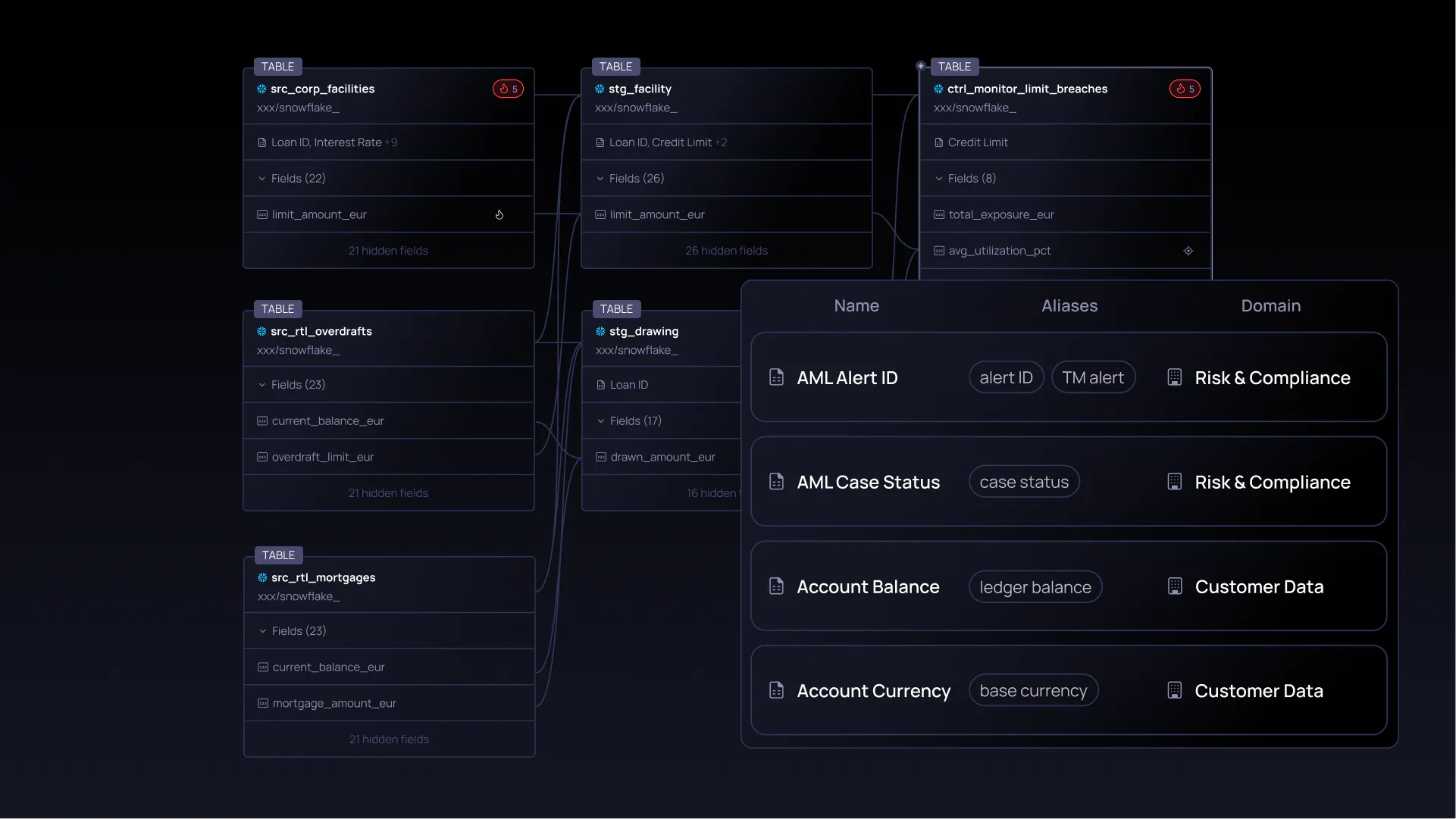
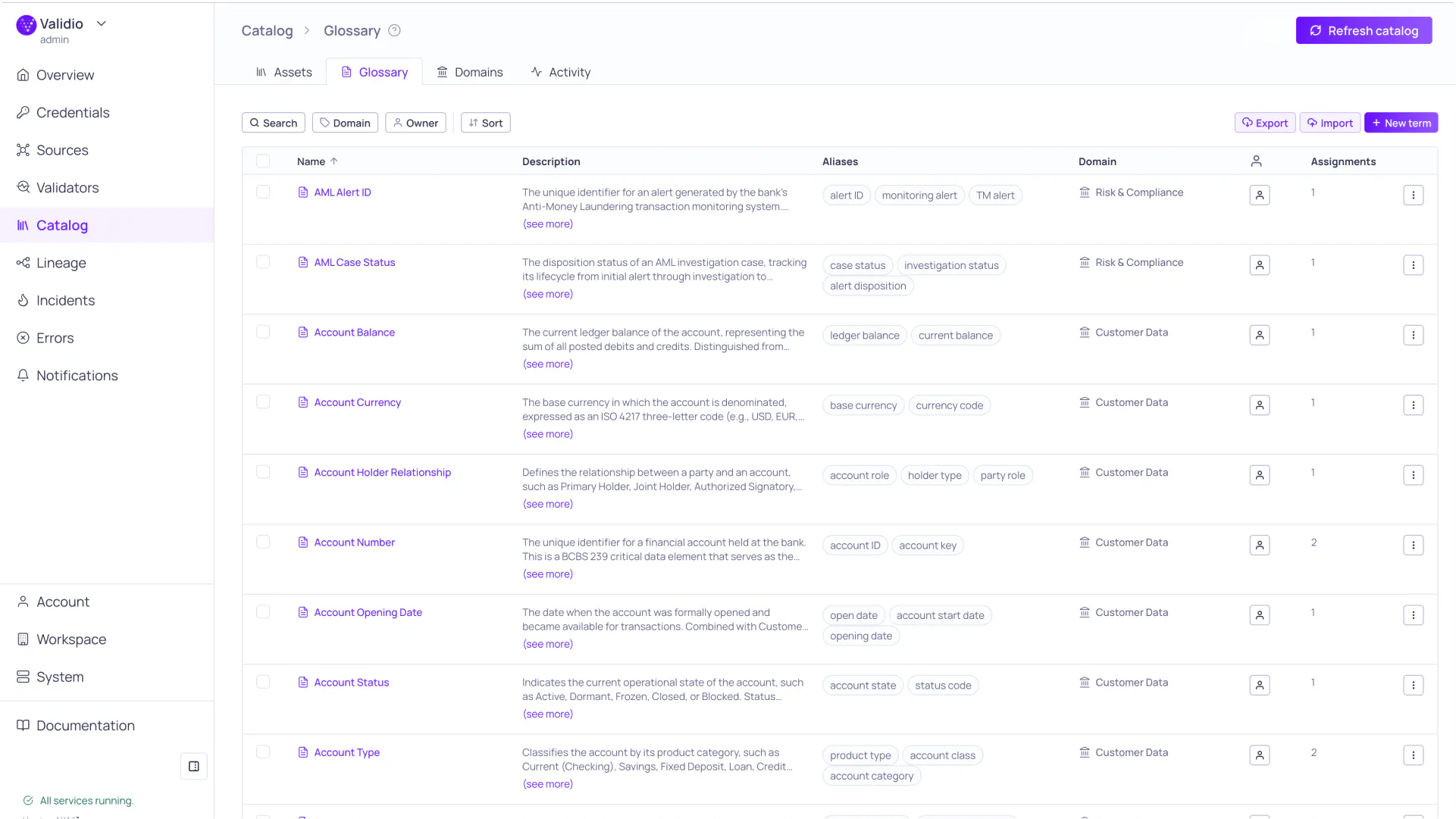
The Business glossary gives your organization a shared, searchable language for data visible in Validio: from the catalog to lineage views to filters.

You can create and organize terms with descriptions, aliases, domain categorization, and ownership. If you're starting from scratch, the import functionality gets you from zero to a fully annotated glossary in minutes rather than months.

One vocabulary for your entire data estate

Define business terms once and see them everywhere your data appears — in the catalog, in lineage views, in filters. Create, organize, and curate terms with descriptions, aliases, domain categorization, and ownership. Import existing glossaries via CSV to get started in minutes, not months.

Assign once, propagate everywhere

Tag a glossary term to a source table, then propagate it to every connected downstream asset with one click. As pipelines evolve, business context stays current without manual maintenance. Propagated assignments are visually distinct from manual ones, so you always know where a term originated.

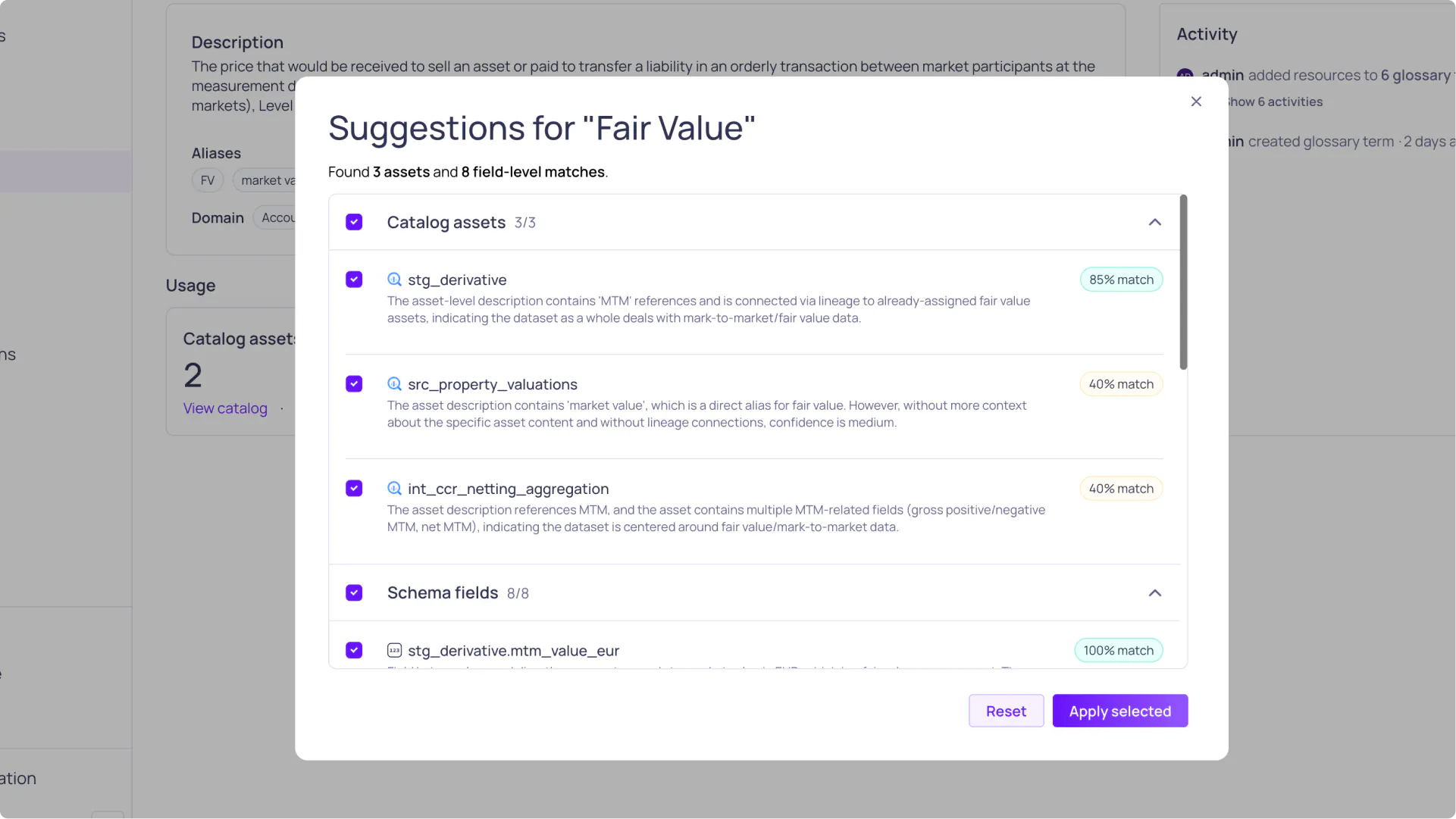
AI finds the matches you missed

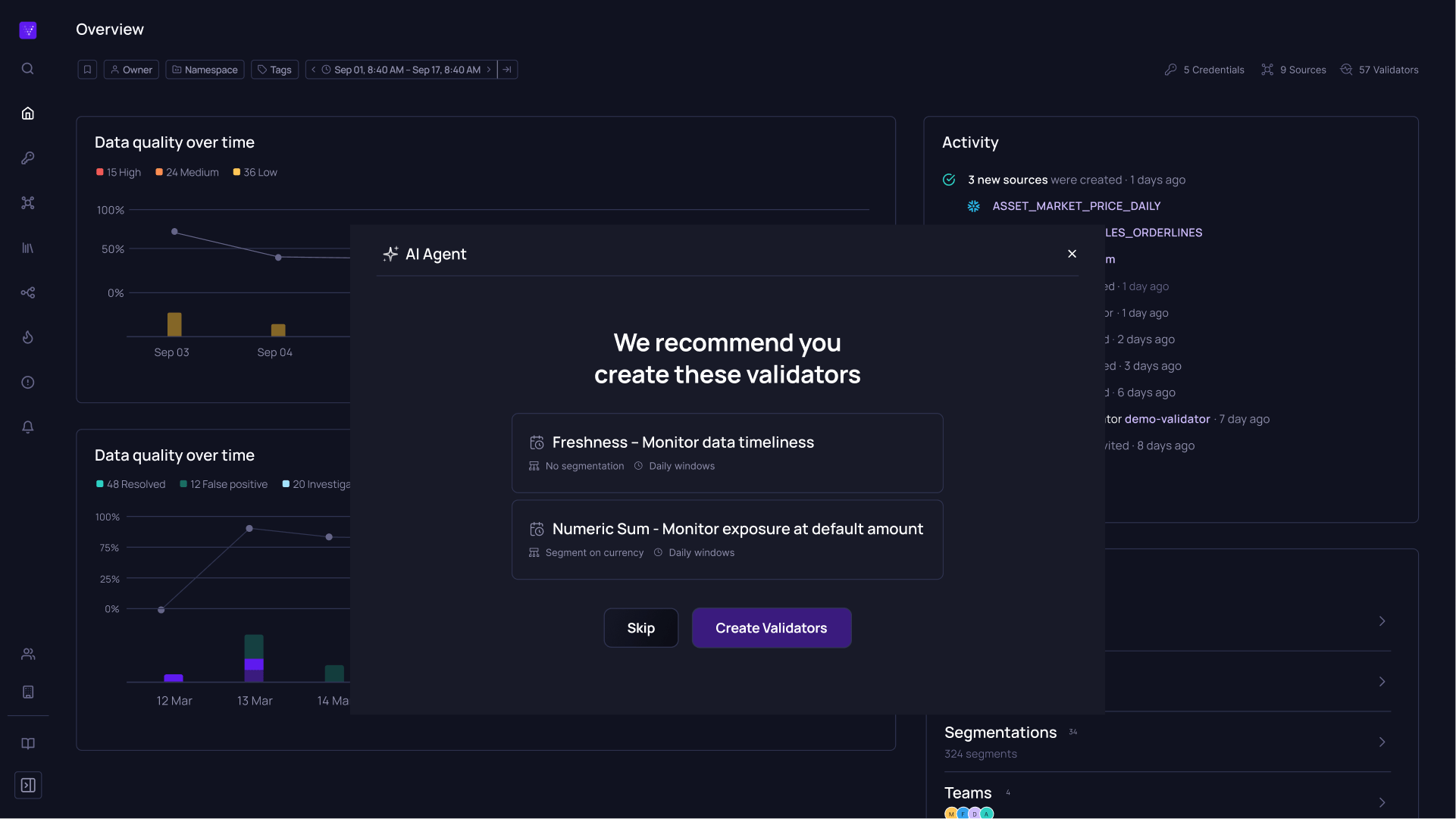
Automated discovery identifies which assets and fields should be tagged with each term — using text pattern matching, lineage analysis, and LLM refinement. Import hundreds of terms and have them intelligently assigned across your catalog instead of spending weeks doing it manually.

The business glossary gives a complete overview of the data estate.
AI-agent gives recommendations for matches to be tagged with "Fair Value".

Interactive lineage: built for real-world complexity

Lineage is not something new in Validio, but this time around we rebuilt the lineage visualization from the ground up.

The updated lineage experience is built for the kind of infrastructure data teams actually run: pipelines with dozens of stages, multiple upstream branches, assets from different sources and systems.

Interactive lineage built for real-world complexity

A ground-up rebuild replaces the previous visualization with a modern HTML/SVG engine. Start with anchor assets and expand upstream or downstream on demand. Focus on a single asset or field to see only connected paths. Filter by glossary term, domain, tag, asset type, location, source status, or free text. Save views and share them via URL.

Root cause analysis with business context

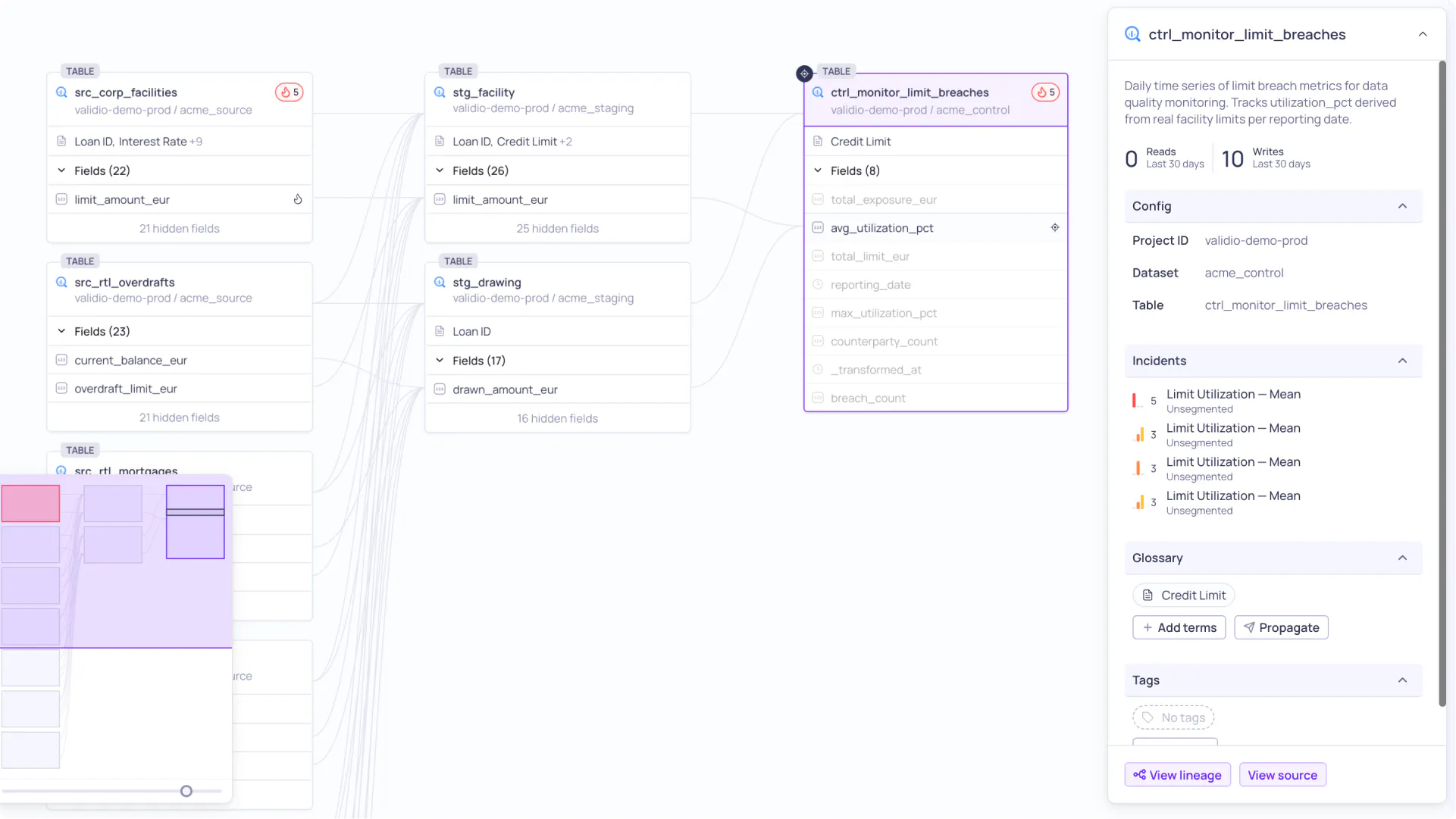
When an incident fires, the lineage graph automatically focuses on affected assets with severity indicators. Glossary terms on each node immediately convey the business significance — turning a technical investigation into a business-impact assessment. Configurable time ranges let you scope the analysis to the relevant window.

The lineage shows the root-cause of an incident on the avg_utilization_pct field on the ctrl_monitor_limit_breaches table.

What this looks like in practice

Let’s look at a few real-world use cases to understand how this adds value in practice.

Enterprise glossary rollout

A data governance team imports 200+ business terms via CSV. They use AI-powered suggestions to automatically find matching assets and fields across the catalog. Within a day, their entire data warehouse is annotated with business context that every analyst can search and browse.

Regulatory compliance

A compliance officer needs to understand all data assets related to "Personally Identifiable Information." They search the glossary, click the PII term, and see every assigned asset and field with counts. They click through to lineage to see the complete data flow from source to downstream consumers, ensuring all handlers of PII are accounted for.

Onboarding new team members

A new data analyst browses the glossary to learn the organization's business vocabulary. They explore lineage to see how key business concepts flow through the pipeline — from source systems through transformations to the dashboards they'll use daily. Saved lineage views from senior team members provide curated starting points.

The convergence of quality and governance

Data quality and data governance have long lived in separate tools, maintained by separate teams, solving separate problems. Quality monitoring tells you something broke. Governance tools tell you what things mean and where they live. Neither answers both questions at once.

That separation has a real cost. When an incident fires, you lose time switching contexts, chasing down data owners, and manually assembling the picture that should already be in front of you. Business context that took weeks to document sits in a tool nobody opens during an incident investigation. 

There’s also another dimension that is becoming increasingly hard to ignore: AI agents.

As teams adopt agentic data quality workflows, the quality of what those agents can do is directly constrained by the context they have access to. An agent that can detect an anomaly in rev_net_adj but doesn't know that it maps to "adjusted net revenue," that it feeds the CFO's weekly reporting dashboard, or that it sits three hops downstream from a source with a known schema change history - that agent can tell you something broke, but not much more. Business context isn't a nice-to-have layer on top of data quality. For AI agents to be genuinely useful in a data quality workflow, it's a prerequisite. 

Validio 8.1 is built on the premise that quality monitoring, governance, and AI capability belong together - that the moment you detect a quality issue is exactly the moment you need business context and lineage at your fingertips. Not in a separate tab. Not on a separate platform. Right there, in the same view, available to both the humans investigating the issue and the agents working alongside them.

Want to see the business glossary

and interactive lineage in action?

Book a demo